
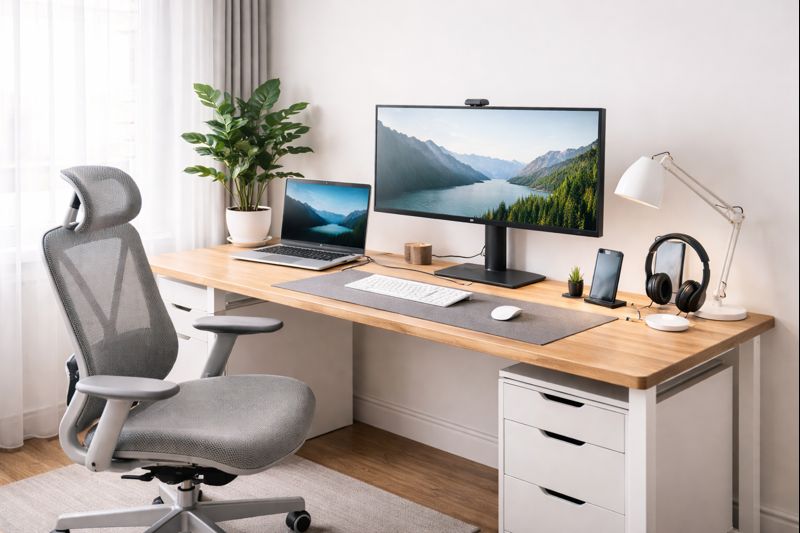
Your home office is no longer a convenience.
It is infrastructure.
For senior professionals, executives, and serious work-from-home operators, the quality of your workspace directly determines the quality of your output, your health, and the long-term trajectory of your career. This is not metaphorical. It is measurable in cognitive performance, error rates, physical endurance, stress load, and recovery time.
Most people still treat the home office like furniture selection.
High performers treat it like system design.
This guide is about building a performance environment — one that protects your energy, sharpens your thinking, preserves your body, and allows you to operate at a consistently high level for years without the slow decay that so many professionals quietly accept.
Why This Actually Matters
Every hour of focused work requires four things to be stable:
- Your nervous system
- Your musculoskeletal alignment
- Your visual and auditory load
- Your mental bandwidth
When your environment degrades any of those, your brain compensates by burning energy.
That compensation shows up as fatigue, irritability, shorter attention span, more mistakes, and slower recovery.
Over months, that becomes burnout.
Over years, that becomes chronic pain and stalled performance.
A properly designed home office reverses that curve.
The Performance Model Behind Elite Workspaces
Every effective workspace, whether corporate or home-based, supports three underlying conditions:
Physiological Stability
Your body remains in neutral alignment with minimal muscular strain. The nervous system stays calm because joints, spine, neck, and shoulders are not under constant stress.
Cognitive Load Control
Your environment does not force your brain to process unnecessary information. Visual clutter, acoustic noise, poor layout, and inefficient tool placement silently consume working memory.
Energy Preservation
The space supports long work sessions without collapse. Light, temperature, movement, and recovery cycles are engineered, not accidental.
Every design decision that follows in this guide maps back to those three conditions.
Choosing the Right Location: The Strategic Starting Point
Before equipment, before furniture, before any purchases — the room itself must be chosen correctly. The wrong location will sabotage everything that follows.
Natural light is not a luxury. It anchors circadian rhythm, stabilizes mood, and improves alertness. Your desk should ideally sit perpendicular to windows: you capture ambient daylight without glare, while avoiding the constant visual contrast that tires the eyes.
Acoustic control is equally important. Even sounds you believe you are ignoring increase cognitive load. Background noise forces the brain to perform continuous filtering. Over time, that produces mental fatigue and shortens deep-focus intervals.
Thermal comfort is not subjective. Cognitive performance drops measurably when the environment drifts outside the comfort range. Many home offices fail here without the occupant ever realizing why work feels heavier than it should.
Spatial psychology completes the foundation. Tight, cluttered spaces elevate baseline stress and accelerate fatigue. Even modest square footage can feel expansive and calm when the layout is engineered correctly.
Layout as Cognitive Engineering
Your layout determines how your brain experiences work.
A desk facing a wall creates subtle psychological confinement. Facing open space reduces subconscious tension. Primary tools should fall within immediate reach without visual scanning. Secondary tools belong in peripheral zones. Everything else should be stored cleanly out of sight.
This reduces micro-decisions.
Micro-decisions consume mental bandwidth.
Mental bandwidth is your most valuable asset.
This is why elite workspaces feel effortless while improvised ones feel draining — the friction is invisible, but the cost is constant.
Light, Energy Regulation & Biological Performance
Light is not decoration. It is biological input. Your nervous system interprets light intensity and color temperature as signals that regulate alertness, hormone production, focus, emotional stability, and recovery. When light is wrong, productivity becomes physiologically expensive. When light is engineered correctly, energy stabilizes and cognitive endurance increases dramatically.
Most home offices fail at lighting because they rely on overhead room light alone. This creates harsh contrast, eye strain, and mental fatigue. High-performing workspaces use layered lighting: ambient room illumination, adjustable task lighting at the desk, and optional accent light to reduce visual contrast across the room.
Throughout the day, your lighting should shift with your energy demands. Cooler, brighter light in the morning and early afternoon enhances alertness and reaction time. Warmer tones later in the day reduce overstimulation and protect sleep cycles.
Good / Better / Best — Task Lighting
Good: Basic adjustable LED desk lamp with brightness control.
Browse LED desk lamps
Better: LED desk lamp with adjustable brightness and color temperature.
Browse adjustable color temperature desk lamps
Best: Studio-grade task lighting with high CRI, full brightness and temperature control for precise visual comfort across long workdays.
Browse high CRI professional desk lamps
Good / Better / Best — Ambient & Contrast Control
Good: Soft room lamp placed behind the desk to reduce contrast.
Better: Dual-lamp system with warm accent light behind the monitor and soft side fill lighting.
Best: Full layered lighting system combining task light, ambient fill, and bias lighting behind the display for maximum eye comfort and visual stability.
When lighting is engineered this way, your eyes remain relaxed, your nervous system remains calm, and your focus remains available for actual work — not for fighting the environment.
Desk Selection, Standing & Movement as a Performance System
Your desk is not simply a surface for equipment. It is the structural foundation of your entire performance system. Its height, stability, size, and adaptability directly affect posture, circulation, breathing efficiency, spinal alignment, and cognitive endurance.
When your desk is wrong, your body compensates. Shoulders rise. The spine collapses. The neck migrates forward. Over hours, this creates muscular tension and neurological stress that quietly erodes focus and stamina.
High-performing professionals treat the desk as a piece of performance equipment — not furniture.
The Case for Standing & Movement
The human body is not designed for static posture. Prolonged sitting reduces blood flow, oxygen delivery, and glucose regulation in the brain. This is why focus degrades during long seated work sessions.
Alternating between sitting and standing every 30–60 minutes significantly improves alertness, energy stability, and long-term health. The best workspaces are engineered to make movement natural and effortless, not disruptive.
Desk Size & Stability Requirements
For most professionals, a desk depth of at least 30 inches and width of 60–72 inches creates ideal working conditions. Stability matters more than aesthetics. Even subtle wobble forces your nervous system to compensate and reduces cognitive efficiency.
Good / Better / Best — Desks
Good: Fixed-height desk with sufficient depth and width, solid construction.
Browse fixed office desks
Better: Electric standing desk with programmable height presets and stable dual-motor frame.
Browse electric standing desks
Best: Premium motorized desk with high-load capacity, ultra-stable frame, programmable memory, integrated cable management, and hardwood or advanced composite surface.
Browse premium executive standing desks
Good / Better / Best — Standing Support & Fatigue Control
Good: Basic anti-fatigue floor mat.
Browse anti-fatigue mats
Better: Thick ergonomic anti-fatigue mat with contoured surface for circulation.
Best: Advanced ergonomic mat combined with supportive footwear to minimize joint load and maximize standing endurance.
When your desk system is engineered correctly, posture stabilizes, circulation improves, and work becomes physically sustainable over long horizons.
The Chair: Spinal Health, Posture & Long-Term Performance
No single piece of equipment affects your long-term performance more than your chair. It is the interface between your body and the work you do for thousands of hours each year. Poor seating does not merely cause discomfort — it slowly degrades spinal health, compresses joints, impairs circulation, and creates neurological stress that erodes focus and energy.
High performers do not buy chairs for comfort alone. They buy chairs to preserve posture, protect the spine, and maintain consistent work capacity across years and decades.
Why the Spine Determines Your Work Capacity
The spine is your central performance axis. When lumbar support is insufficient, the pelvis rotates backward, the upper back rounds, the neck migrates forward, and the entire musculoskeletal chain is forced into compensation. Over time this produces chronic pain, nerve compression, headaches, and premature fatigue.
A properly engineered chair maintains the natural S-curve of the spine, keeping the nervous system calm and the body in mechanical equilibrium.
What Real Ergonomic Adjustment Means
True ergonomics is not marketing. It is the ability to place your body into neutral alignment and keep it there effortlessly.
Critical adjustment points include seat height, seat depth, lumbar height and depth, armrest height and width, recline tension, and back angle. If a chair cannot make these adjustments, it is not a serious professional tool.
Good / Better / Best — Chairs
Good: Adjustable ergonomic mesh chair with lumbar support and basic seat and armrest adjustment.
Browse ergonomic office chairs
Better: Advanced ergonomic chair with independent lumbar adjustment, multi-axis armrests, adjustable seat depth, and smooth recline.
Browse advanced ergonomic chairs
Best: Flagship executive ergonomic chair with full adjustability, dynamic lumbar support, advanced recline mechanics, premium materials, and long-term structural durability.
Browse premium executive chairs
Seat Height, Depth & Arm Positioning
Correct seat height places your feet flat on the floor with knees at or slightly below hip height. Seat depth should leave two to three fingers of space behind the knees. Armrests should support the elbows without lifting the shoulders, allowing the forearms to float naturally over the keyboard.
When these relationships are correct, muscle tension drops, circulation improves, and work becomes physically sustainable for long sessions.
Your chair is not an accessory. It is one of the most important investments in your career.
Display, Vision & Cognitive Load Management
Your visual system is the primary gateway through which work enters the brain. When your display setup is wrong, your eyes, neck, and nervous system are forced to compensate continuously. Over time this produces eye strain, headaches, neck pain, and a measurable decline in cognitive endurance.
High-level work requires visual efficiency. That efficiency is engineered through correct screen size, placement, distance, and alignment.
Why Monitor Placement Controls Posture
Your eyes drive your posture. When a monitor sits too low, your head migrates forward. For every inch of forward head movement, the effective load on your neck increases dramatically. Over hours and years, this destroys spinal health and accelerates fatigue.
Proper placement keeps the head stacked over the spine and the nervous system in mechanical equilibrium.
Optimal Screen Geometry
Your primary display should place the top of the screen at or slightly below eye level, roughly one arm’s length from your face. The screen should sit directly in front of you — not angled — so your neck remains neutral.
Most professionals perform best with either dual 27-inch monitors or a single ultrawide display, depending on workflow.
Good / Better / Best — Displays
Good: Single 27-inch 1440p monitor.
Browse 27-inch monitors
Better: Dual 27-inch monitor setup on adjustable arms.
Browse dual monitor mounts
Best: Ultrawide 38–49 inch display paired with a secondary vertical monitor for reference work.
Browse ultrawide displays
Good / Better / Best — Monitor Arms
Good: Single adjustable monitor arm.
Browse monitor arms
Better: Dual-arm mount with full articulation.
Best: Premium gas-spring arms with precision height control and maximum stability.
When your visual system is engineered correctly, neck strain disappears, eye fatigue drops, and focus becomes dramatically easier to sustain.
Audio, Video & Professional Presence
In modern professional work, your communication tools are no longer secondary. They are your presence. How you sound and how you appear on calls directly affects how others perceive your competence, authority, and credibility.
Most professionals underestimate how much poor audio and video quality increase cognitive load for both themselves and their audience. Clear communication reduces friction, shortens meetings, and improves outcomes.
The Cognitive Cost of Bad Audio
When audio is distorted, compressed, or inconsistent, the brain must work harder to decode speech. This increases fatigue and reduces comprehension. Over the course of a day filled with meetings, the effect becomes enormous.
Good audio is not a luxury. It is a productivity tool.
The Authority Signal of Good Video
High-quality video instantly elevates perceived professionalism. Clear image, proper framing, and stable lighting all contribute to how seriously your contributions are taken.
Good / Better / Best — Webcams
Good: 1080p HD webcam with autofocus.
Browse 1080p webcams
Better: 4K webcam with improved low-light performance and field-of-view control.
Browse 4K webcams
Best: Mirrorless camera with capture card for broadcast-quality video.
Browse mirrorless cameras
Good / Better / Best — Microphones
Good: USB condenser microphone.
Browse USB microphones
Better: Broadcast-quality USB mic with onboard processing and noise rejection.
Best: XLR microphone with audio interface for studio-grade sound.
When your communication tools are engineered correctly, meetings become shorter, clearer, and less exhausting — for everyone involved.
Cable Management, Storage & Mental Clarity
Visual disorder creates cognitive disorder. When your workspace is cluttered, your brain is forced to process unnecessary information continuously. This consumes mental bandwidth that should be reserved for problem solving, decision making, and creative work.
Clean physical systems produce clean mental states. This is why elite workspaces feel calm even when the work itself is intense.
Why Clutter Is a Performance Tax
Every visible object competes for attention. Even when you believe you are ignoring it, your brain is still processing it. Over hours, this creates mental fatigue and reduces sustained focus.
High performers remove everything from view that is not directly involved in the current task.
Engineering Visual Simplicity
Cables, chargers, power bricks, and unused devices should disappear from sight. Storage should move low-use items off the primary work surface while keeping essential tools within immediate reach.
Good / Better / Best — Cable Management
Good: Basic under-desk cable tray and Velcro wraps.
Browse desk cable management systems
Better: Full under-desk channel system with mounted power strip and labeled wiring.
Best: Integrated desk cable management with concealed power routing and magnetic access panels.
Good / Better / Best — Storage & Organization
Good: Simple drawer unit for desk storage.
Browse desk drawer organizers
Better: Modular shelving system for equipment and reference materials.
Best: Full integrated storage system that keeps all non-essential items completely out of view while preserving fast access to work-critical tools.
When the visual field is clean, the mind becomes calmer, focus lasts longer, and work feels lighter — even when it is complex.
Workflow Engineering & Executive Focus Systems
Your physical workspace is only half of the performance system. The other half is how work flows through that environment. High-performing professionals do not rely on motivation or willpower. They rely on structure.
Structure reduces decision fatigue. It preserves mental bandwidth for high-value thinking.
Designing the Desk for the Current Priority
The desk should communicate one thing to your brain: this is the most important task right now. Everything else should be hidden from immediate view.
This eliminates context switching and protects deep focus.
Single-Tasking for High-Value Output
Multitasking is not productivity — it is rapid task switching. Each switch carries a cognitive cost. Over time, this degrades both quality and speed of work.
High performers organize work into uninterrupted blocks, supported by environments that make distraction difficult.
Energy-Based Scheduling
Elite performers do not schedule by time alone. They schedule by energy. High-cognitive work is reserved for peak energy windows. Administrative and routine tasks fill the low-energy gaps.
Your workspace should support this rhythm: lighting, posture, movement, and sound adjust with your workload.
Building a Focus Ritual
Consistent environmental cues trigger focus states. When your desk, lighting, posture, and tools are aligned, your nervous system learns to enter work mode almost immediately upon sitting down.
This is one of the most powerful productivity multipliers available — and it costs nothing but discipline in design.
Health, Longevity & Burnout Prevention
Burnout is rarely a motivation problem. It is almost always a systems failure.
When your environment quietly taxes your body and nervous system day after day, the brain eventually demands relief. That relief appears as exhaustion, irritability, declining focus, reduced creativity, sleep disruption, and eventually full burnout.
A properly engineered home office is one of the most powerful burnout-prevention tools available to modern professionals.
Protecting the Spine, Joints & Vision
Long-term professional performance is inseparable from physical health. Chronic back pain, neck strain, wrist injuries, and eye fatigue shorten careers, reduce work capacity, and increase recovery time.
High-performing professionals treat their bodies as strategic assets. Chairs, desks, displays, lighting, and movement are selected and arranged not for comfort alone, but for biomechanical longevity.
Micro-Recovery Inside the Workday
Elite performance is not about working harder. It is about managing fatigue more intelligently.
Micro-recovery cycles — standing, walking briefly, changing posture, shifting visual focus — reset the nervous system and restore mental clarity. A well-designed office makes these resets effortless instead of disruptive.
Sleep Protection & Circadian Stability
Evening overstimulation from harsh lighting and prolonged screen exposure destroys sleep quality. Poor sleep destroys executive function the next day.
Lighting systems that transition to warmer tones late in the day, combined with disciplined screen habits, preserve sleep cycles and protect long-term cognitive health.
Stress Load & Environmental Calm
Clutter, noise, poor ergonomics, and chaotic workflow all increase baseline stress. Over months, that stress becomes chronic.
A calm, ordered workspace lowers background stress and creates the conditions for consistent high performance without emotional exhaustion.
Your office is either protecting your career — or slowly undermining it.
Budget Strategy & Sample Executive Builds
The purpose of a budget is not to minimize cost — it is to maximize return on investment. In a home office, the highest returns come from investments that protect your body, stabilize your energy, and preserve cognitive capacity.
Professionals who build offices correctly spend more up front and far less over time. Medical bills, lost productivity, and shortened career lifespan are dramatically more expensive than quality equipment.
How to Allocate Budget Intelligently
Allocate first where the body interfaces with the environment:
Desk & Chair: 45–55% of total budget
Displays: 15–25%
Lighting & Audio: 10–15%
Accessories, Storage & Cable Management: 5–10%
Professional Build — $1,000 to $2,000
Ideal for serious remote professionals seeking major upgrades without overspending.
Includes: Better-tier standing desk, Better-tier ergonomic chair, dual 27-inch monitors, adjustable task lighting, high-quality webcam, broadcast USB microphone, cable management system.
Executive Build — $2,000 to $4,000+
Designed for senior leaders, founders, and executives who require maximum performance and long-term durability.
Includes: Best-tier motorized desk, flagship ergonomic chair, ultrawide display with secondary monitor, studio-grade lighting system, mirrorless camera, XLR microphone chain, integrated storage and cable management.
These systems are built not for aesthetics, but for sustained elite performance.
Final Synthesis & Implementation Framework
By now, the pattern should be clear: elite performance is not accidental. It is engineered.
Your home office is not a collection of products. It is a system. Every component — desk, chair, display, lighting, sound, storage, workflow — interacts with your nervous system, your body, and your mind.
When those components are aligned, work feels lighter, focus lasts longer, recovery becomes faster, and performance compounds over time. When they are not, every day quietly becomes harder than it needs to be.
The Executive Implementation Rule
Build in the following order:
1. Chair and desk
2. Display and vision system
3. Lighting and sound
4. Storage, cable management, and workflow structure
Each layer depends on the stability of the one beneath it.
The Long Game
Your career is a long horizon. The professionals who rise highest are the ones who protect their energy, health, and decision quality year after year.
Your workspace is the foundation of that protection.
Final Word
Your home office is your operating system.
Design it deliberately — and it will quietly multiply everything you do.